Android · iPhone · Android TV · desktop browsers · MCP-first

Real phones your team and AI agents can actually use.

Book a real phone, TV or browser in the browser and run anything in one click. Build flows visually, ask the AI Assistant to do the work, and give Claude, Cursor or your CI the whole lab over MCP.

Sign in with Google, Microsoft or company SSO. Runs on your own Macs and phones, or ours. Plans in rupees, UPI, GST invoices.
lab.yourco.in / live session
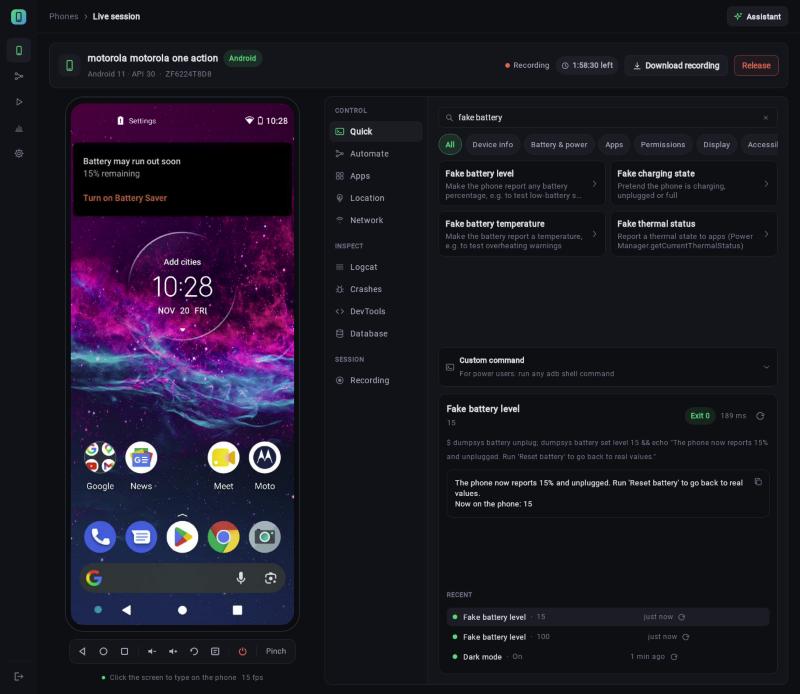
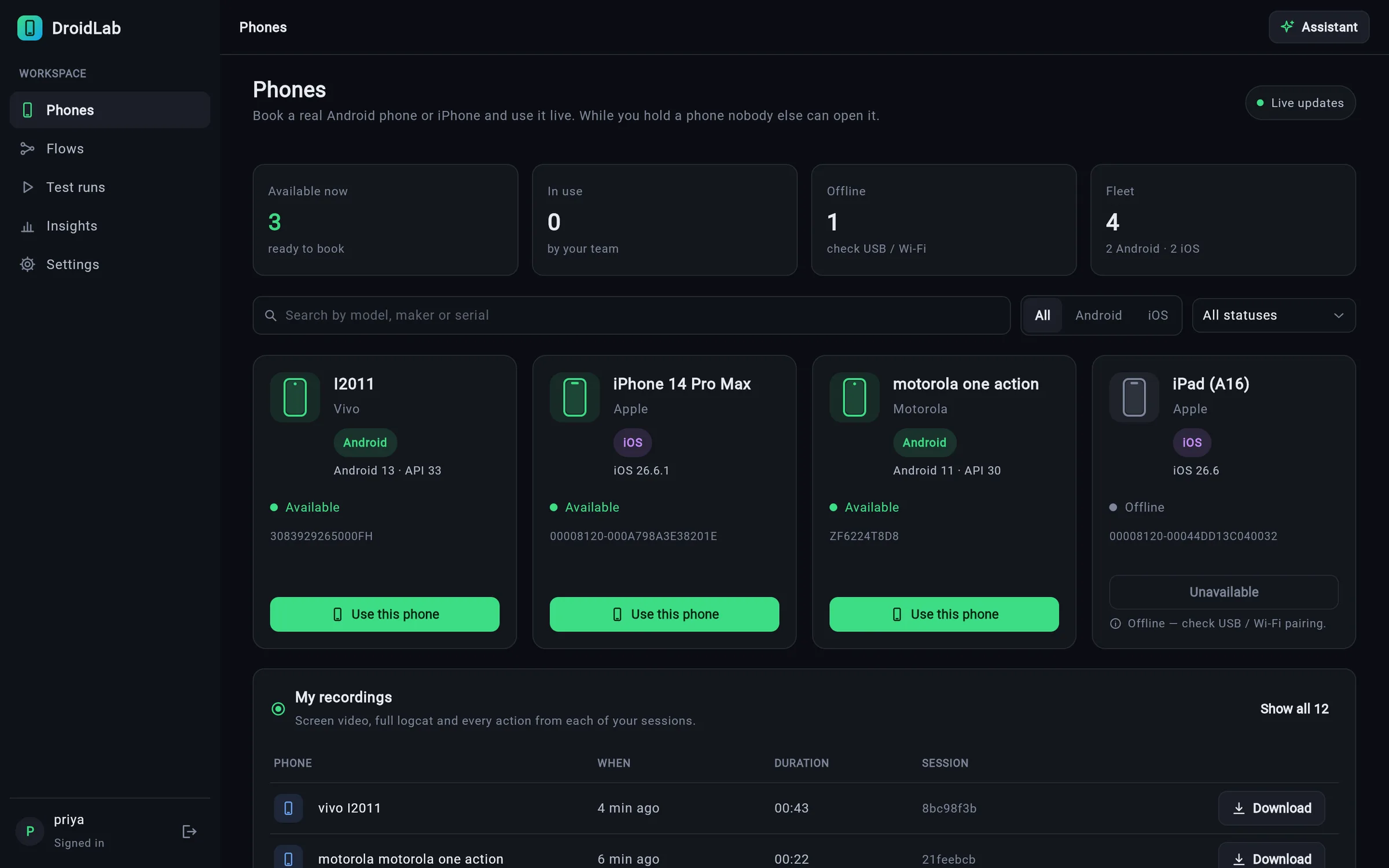
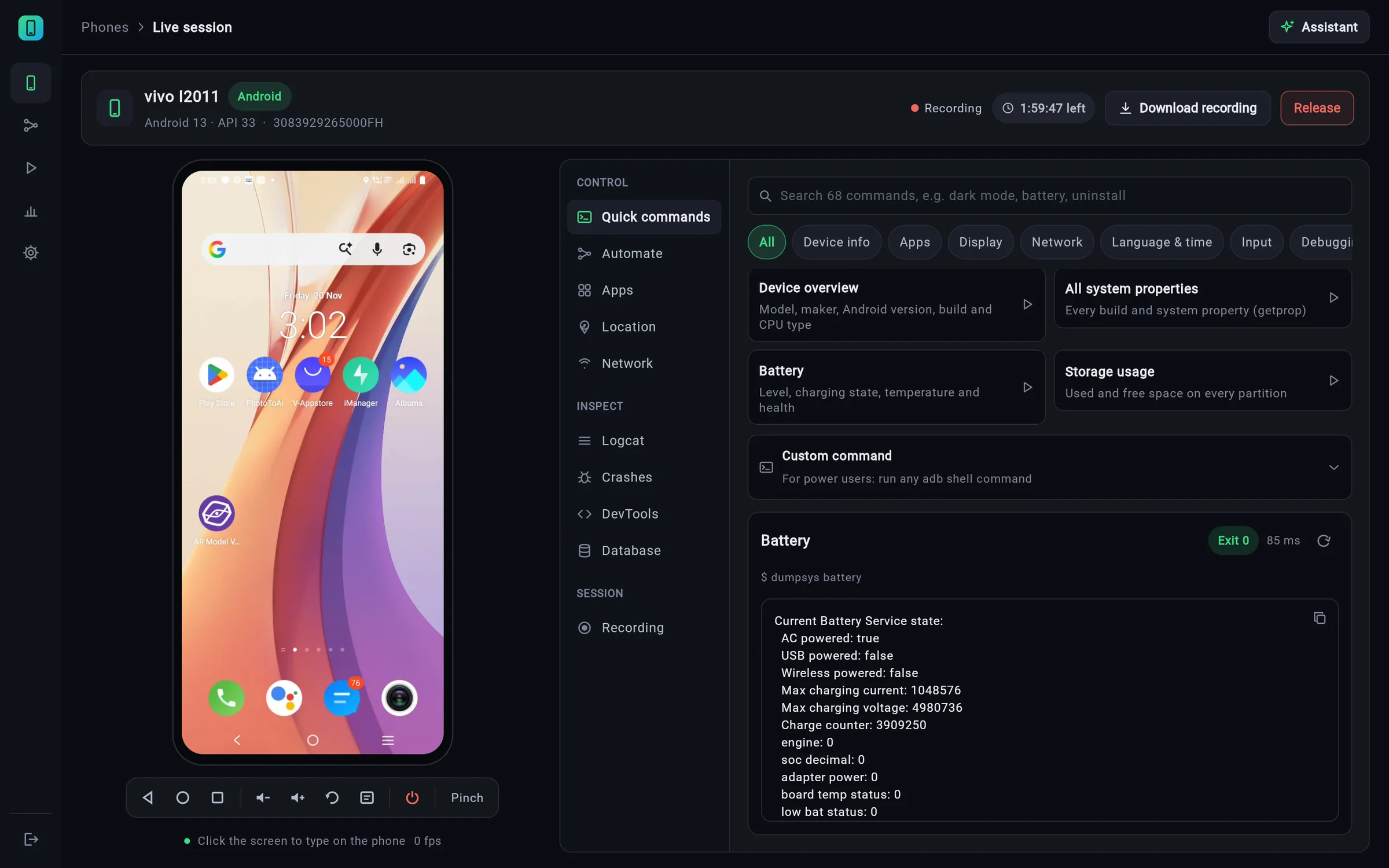
A live vivo phone in the HoP web app, with the one-click Battery command result next to it
Tested on real devices:Motorola one action · Android 11vivo I2011 · Android 13iPhone 14 Pro Max · iOS 26
74MCP tools for AI agents
200+one-click device commands
0lines of JSON to build a flow
4device types: Android, iPhone, TV, browser
Product tour

See it working on real phones.

Unedited screen recordings of the HoP web app driving real phones in our lab.

lab.yourco.in / live session
No typing required

Everything is one click away.

No adb commands to remember and no JSON to write. Anything that needs a value asks for it in a simple form.

Quick commands

171 Android and 37 iPhone commands, ready to run.

Search, click, done. Every form opens on the phone's current value, and after a change HoP reads the phone again to confirm it worked.

  • Battery & power: fake battery level, charging and temperature, battery saver, Doze, app standby
  • Display & accessibility: dark mode, font size, animations, colour inversion, colour-blind simulation
  • Network & location: Wi-Fi, data, airplane mode, 2G/3G speed, private DNS, GPS cities
  • Apps & permissions: app language, grant / revoke, low memory, process death, deep links
  • Developer & performance: layout bounds, overdraw, GPU bars, cold-start time, frame stats
  • iPhone: dark mode, app language and text size, system alerts, background an app, crash logs
  • Commands a phone can't run are greyed out with the reason; risky ones ask first
Fake battery level set to 15%: the live Motorola shows Android's real low-battery warning and HoP confirms 'Now on the phone: 15'
Visual flow builder

Build automations step by step, not in JSON.

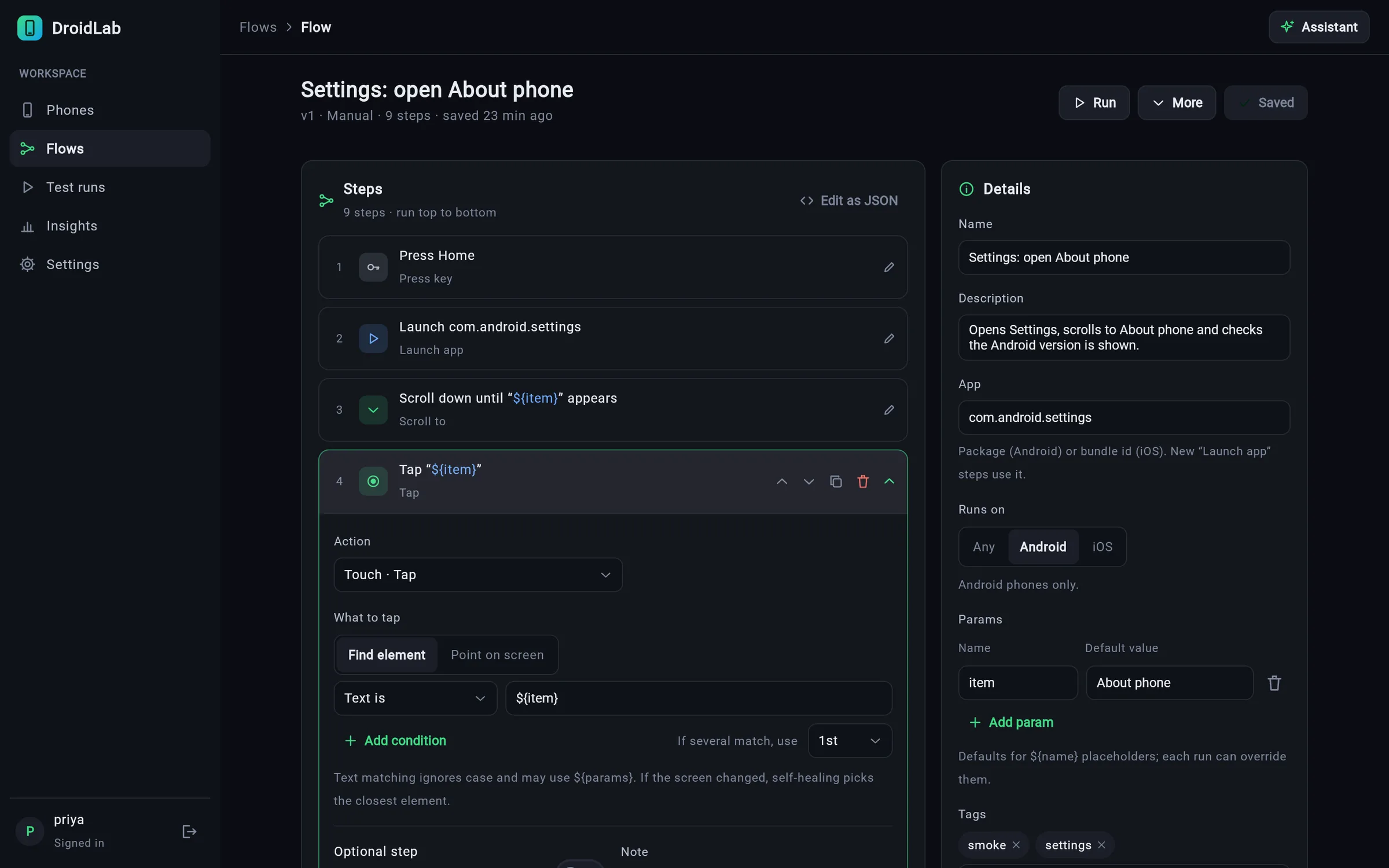
Pick an action, choose what to tap by its text or id, add conditions, and save. Flows are stored in your account, versioned and shared with your team, so the same work runs again tomorrow on any phone.

  • Record from the live screen, or let AI write it
  • ${params} with defaults keep test data out of the steps
  • Same flow on Android and iPhone; steps target elements, not pixels
  • Prefer code? Toggle Edit as JSON or export to Python
Visual flow builder with an expanded tap step
Parallel runs

Run on every free phone at once.

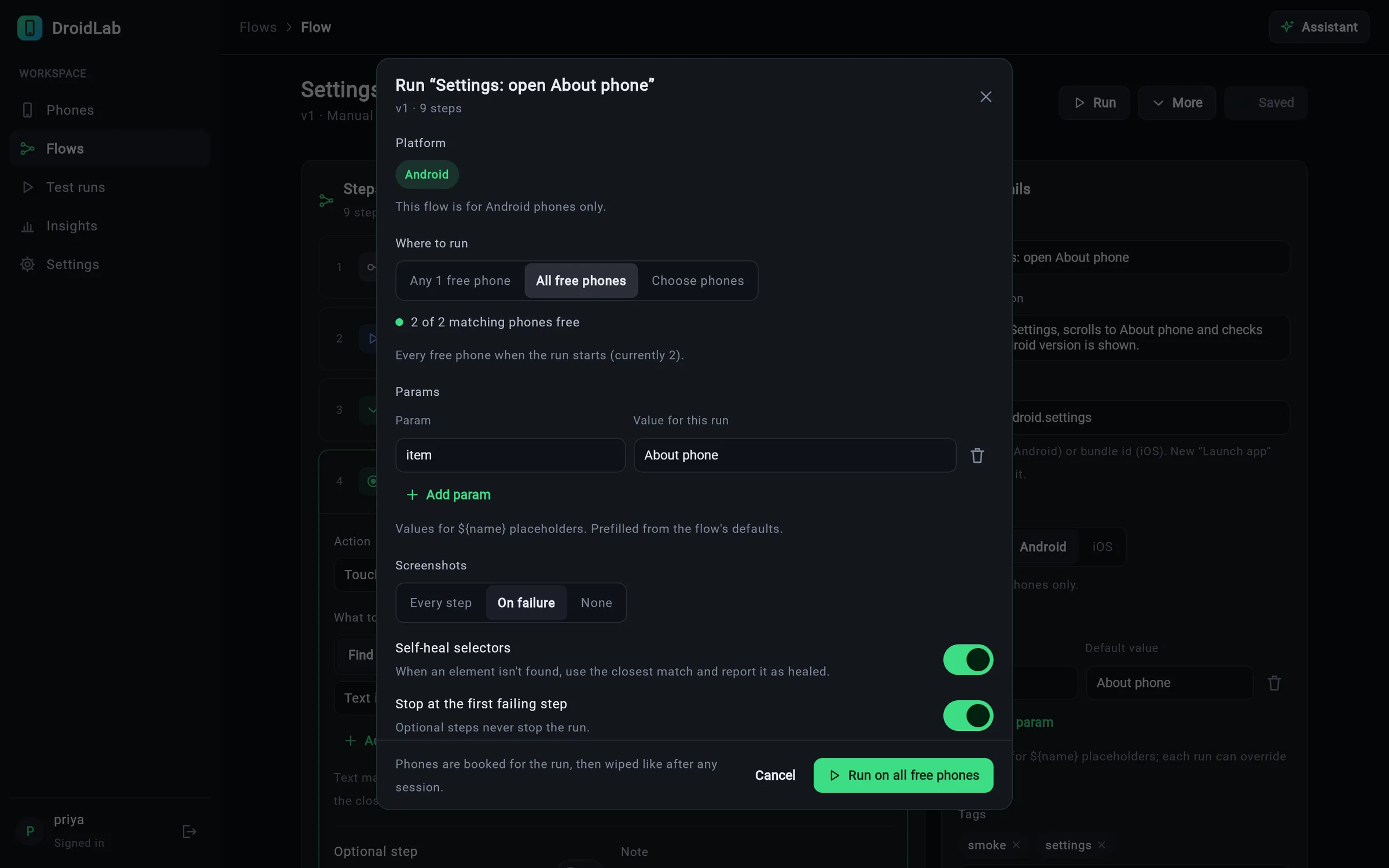
Choose one phone, specific phones or all free phones. Fill in params, pick when to take screenshots, and press Run. Each phone gets its own timeline with step screenshots and a video.

  • Self-healing: when a label changes, the run finds the closest match, marks the step healed, and one click saves the fix
  • Stop at the first failure, or run every step
  • Webhooks to Slack and CI when a run finishes
Run dialog: all free phones, params, screenshots and self-heal options
AI Assistant

Ask in plain words. It does the work.

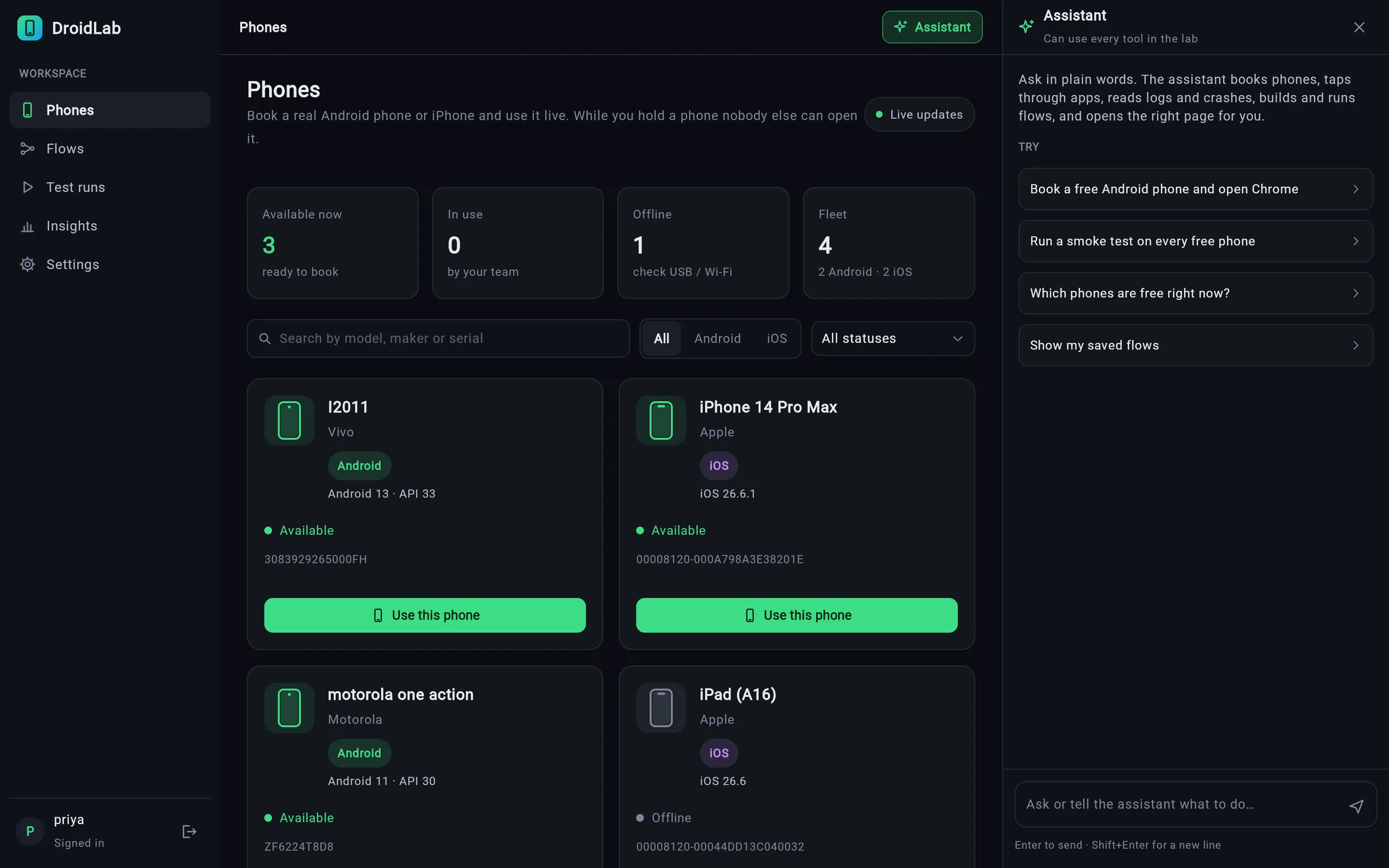
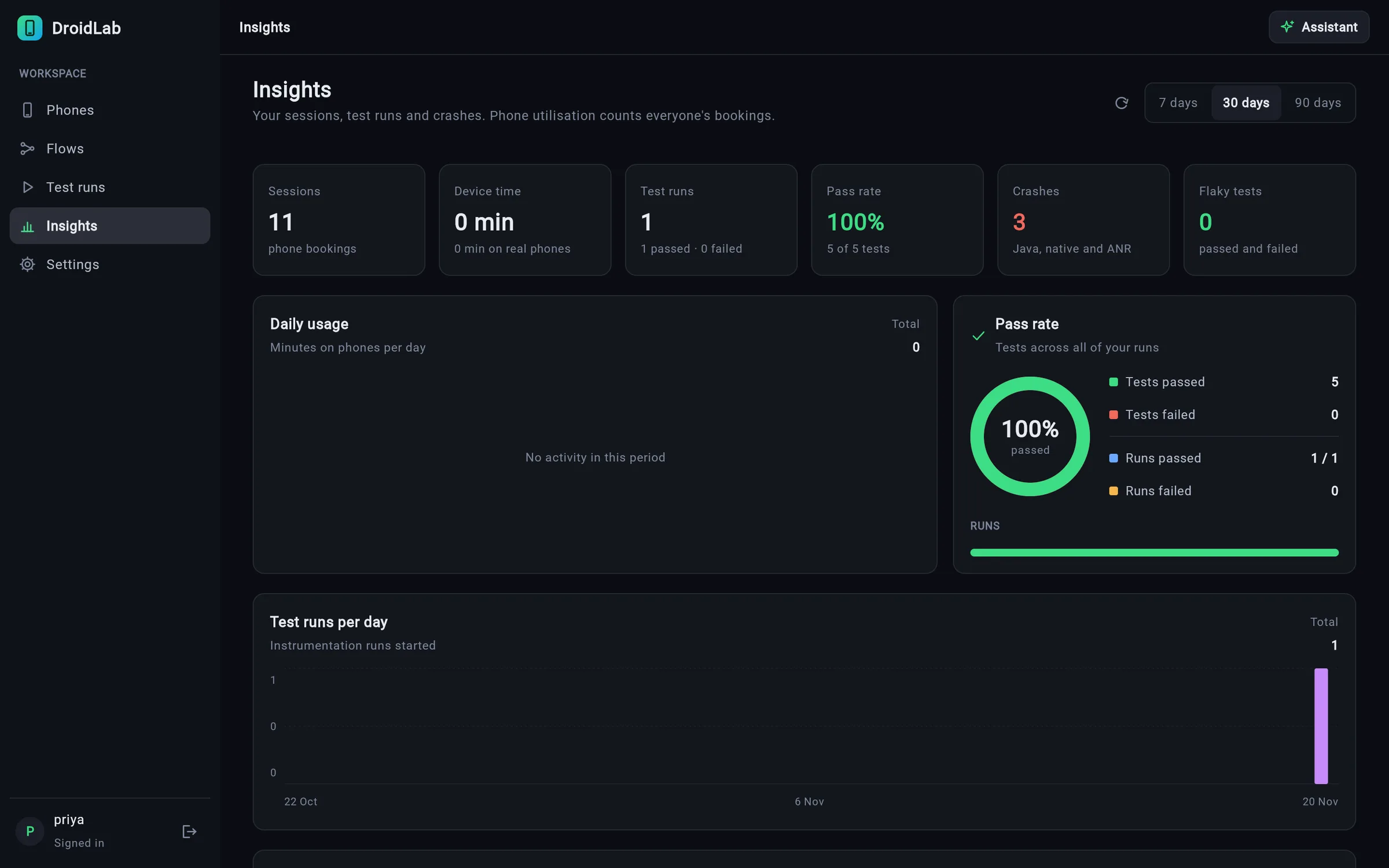
The Assistant sits beside every page and can use every tool in the lab: it books phones, taps through apps, reads logs and crashes, builds and runs flows, and opens the right page for you.

  • Knows which page you are on and which phone you hold
  • Shows each action it took, so nothing is hidden
  • Never types passwords or payment details for you
  • Saves repeatable work as a flow you can run again
AI Assistant panel open on the Phones page with suggestions
One lab, every screen

Phones, iPhones, TVs and browsers.

They share the same device list, exclusive booking, recordings, flows and MCP tools.

Android phones

Over USB or Wi-Fi. Live screen with sound on Android 11+, every debugging tool, Espresso runs and the full set of quick commands.

iPhones and iPads

Through a Mac, with no root or jailbreak. Install your signed .ipa from the Apps tab or MCP. You also get the device log, crash reports, the Safari / WKWebView inspector, the performance timeline and XCUITest runs.

Android TV and OTT boxes

Shown landscape with an on-screen remote: D-pad and OK, Back, Home, media keys and volume. Arrow keys work too, and agents book TVs with form_factor: "tv".

Desktop browsers

Chrome and Edge with captured requests and console, plus Safari and Firefox over W3C WebDriver. Every booking gets a fresh profile, and a Selenium endpoint books one per session.

MCP-first

Give your AI agent the whole lab.

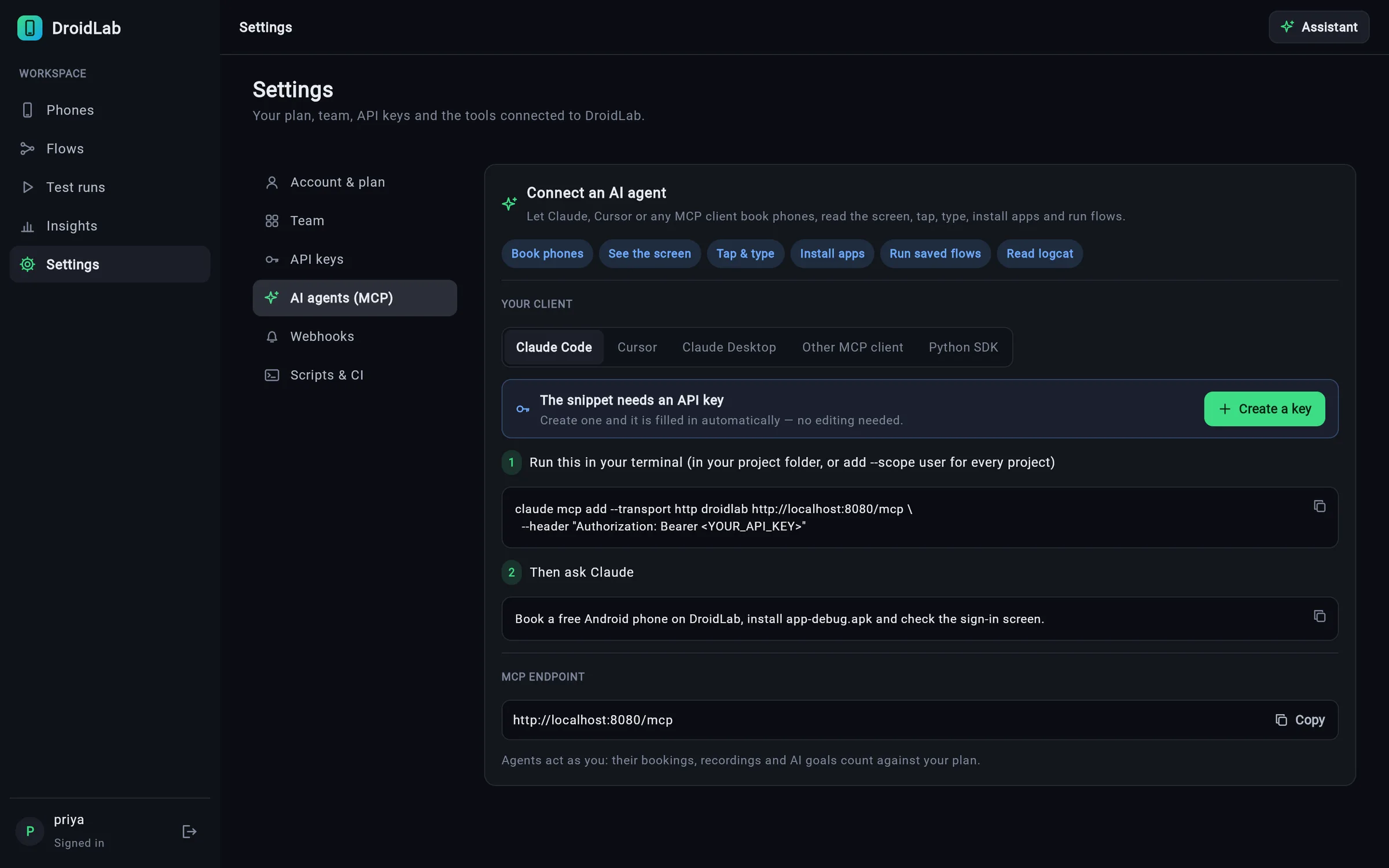
One MCP endpoint with 74 tools, 12 skills and 2 prompts. On connect, the agent is told what HoP is and the rules for shared real devices, then reads the skill for its task. Settings shows a ready snippet for Claude Code, Cursor, Claude Desktop or any MCP client, and creates the API key for you.

book_deviceget_screentaptype_textscroll_towait_forinstall_appget_logsget_crashesget_networkinspect_app_dataset_locationset_networksave_flowrun_flowrun_goalinject_camera_imagebiometricaccessibility_scanget_performancebrowser
Read the MCP Skills →
example: an agent using HoP over MCP
you › Check that Settings › About phone works on every
      free Android, then save it as a flow.
● book_device platform=android
  Booked vivo I2011 · Android 13
● get_screen
  [12] TextView "About phone" @0.50,0.81
● scroll_to text="About phone"
● tap text="About phone"   → About phone
● save_flow name="Settings: open About phone"
● run_flow count=0
  PASSED  motorola one action · 9/9
  PASSED  vivo I2011 · 9/9
Settings › AI agents (MCP) with a copy-paste setup snippet
The full toolbox

Debug like the phone is on your desk.

Every tool works from the browser, the Python SDK and MCP.

Live phone, exclusive booking

Video, touch and keyboard in the browser. While you hold a phone nobody else can open it, and it's reset after release.

Recording & playback

Screen video, logs, every action, network HAR and crashes, in one zip. Open a recording and the performance charts play in sync with the video, on Android and iPhone.

Crashes & logs

Android: Java, ANR and native crashes plus filtered logcat. iPhone: device log and crash reports, symbolicated when the dSYM is on the Mac.

Network & DevTools

Proxy capture plus Chrome/WebView traffic with HTTPS bodies and rendered HTML. The Safari and WKWebView inspector works on iPhone.

App data

SQLite databases and SharedPreferences of debuggable apps, with live queries.

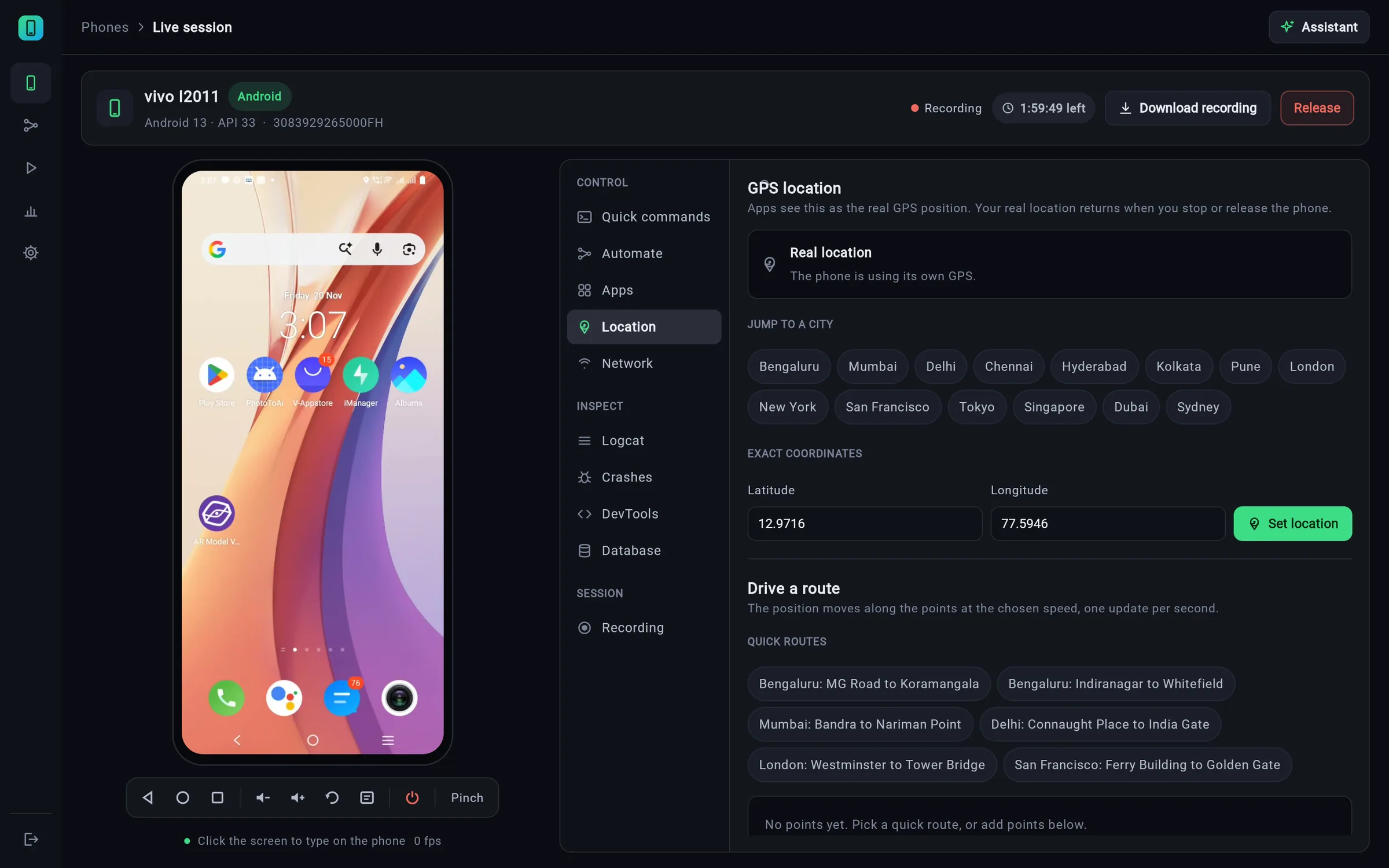
GPS & routes

Jump to a city, set exact coordinates, or drive a route at a chosen speed.

Network shaping

2G, 3G, LTE or offline, to see how your app behaves on real Indian networks.

Espresso, XCUITest & Appium

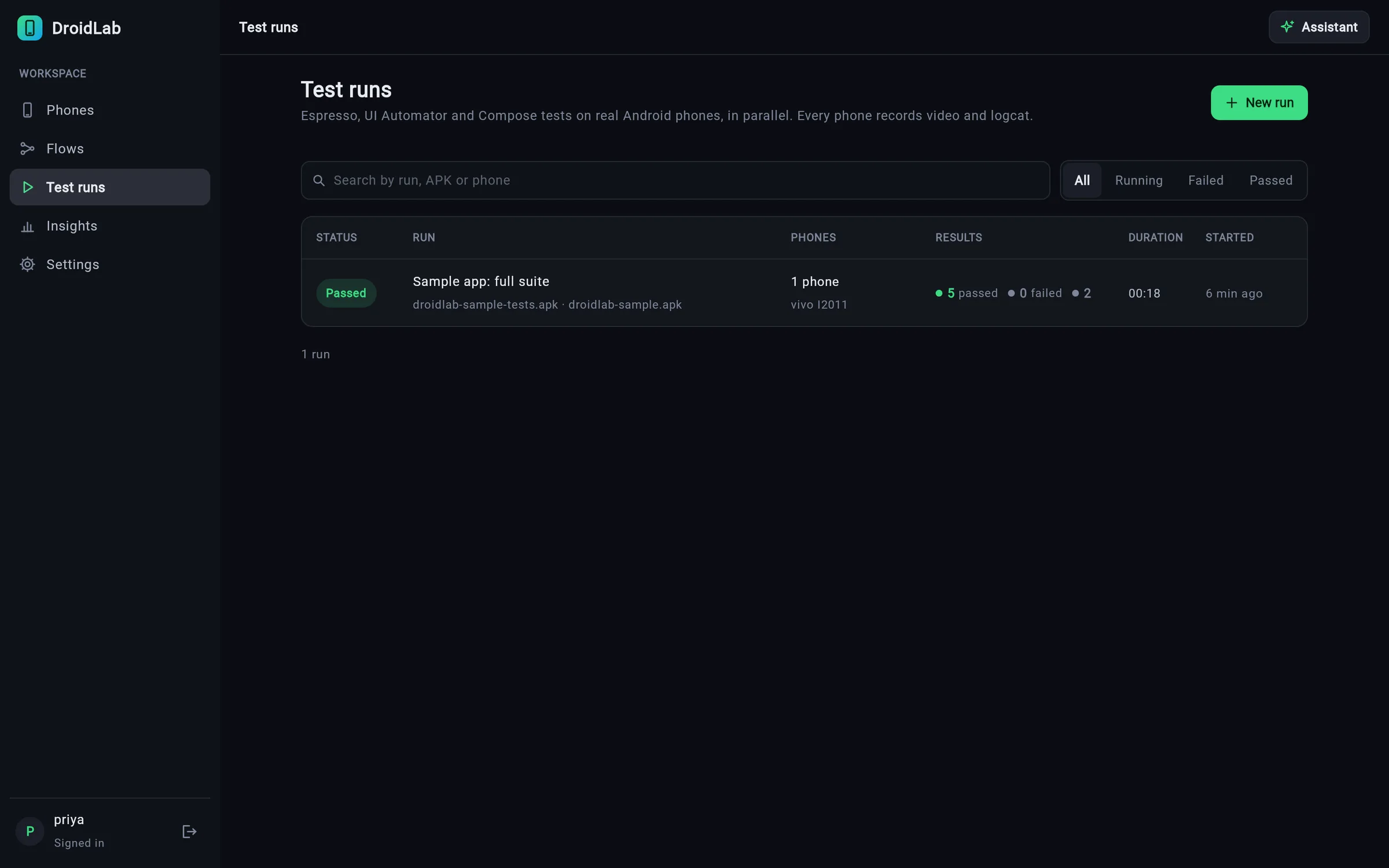
Test runs on many phones in parallel with JUnit XML and shareable PDF reports. There's also an Appium hub at /wd/hub for Android and iPhone.

Performance timeline

App CPU, memory, threads, FPS, janky frames, network and launch times every second. Compare two builds side by side.

Camera image injection

Your app's camera sees a QR code, a sample document or your own image. Use the HoP Camera SDK on Android or the HopCamera Swift Package on iPhone, in debug builds.

Biometrics simulation

Answer Android fingerprint prompts from the lab with Success, Not recognised, Cancel or Lockout. Apps use the HoP Biometrics SDK in debug builds.

Accessibility scan

WCAG-style checks of the current screen on Android and iPhone, covering missing labels, small touch targets and low contrast. Each issue says how to fix it on both platforms.

Share a phone with a link

Send a signed link or QR code to a booked phone, view-only or with control. It expires on its own, and you can revoke it at any time.

Screens

A professional tool, page by page.

Click any screen to see it full size.

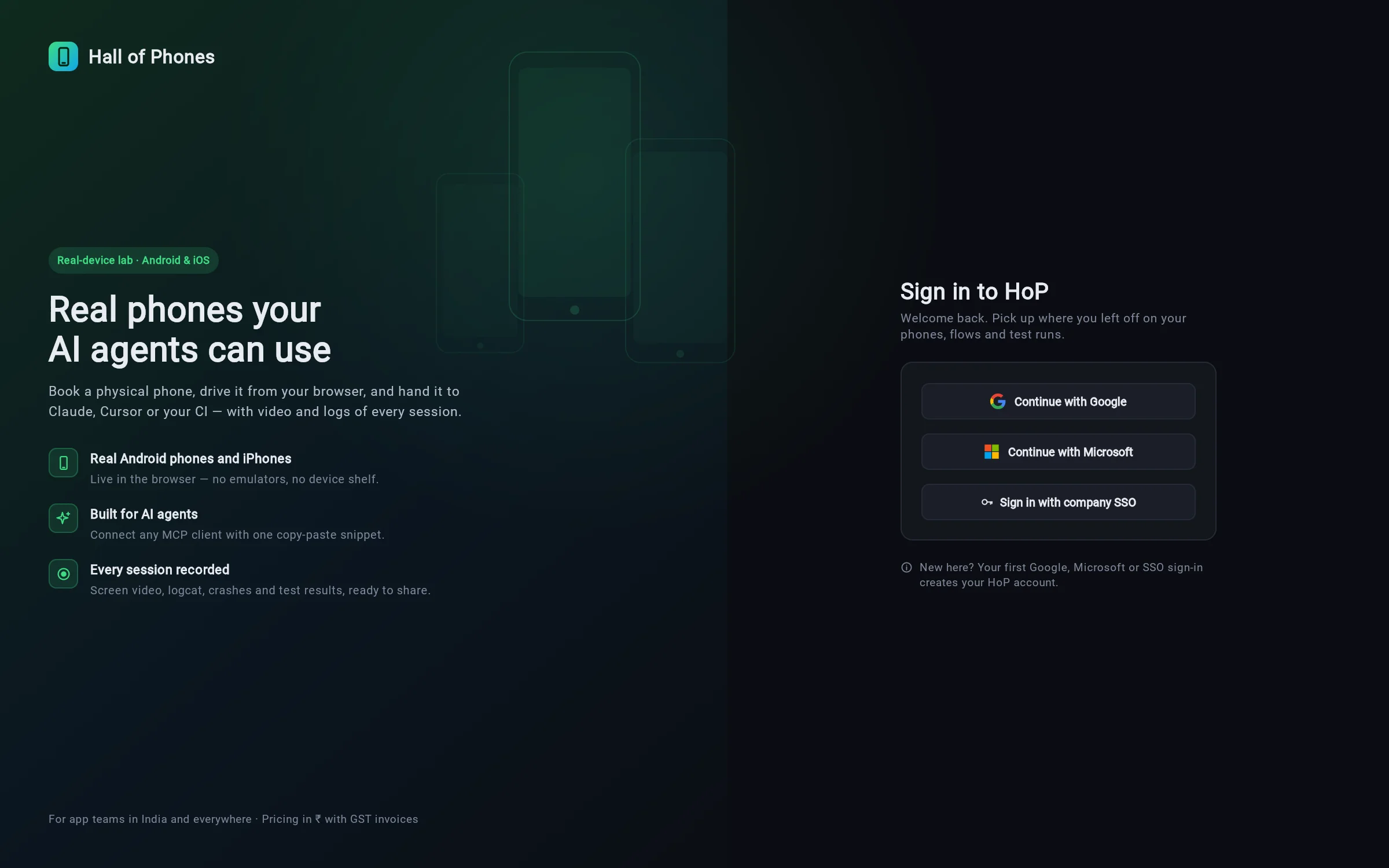
Sign-in & security

No passwords. Just the accounts you already have.

Your team signs in with Google, Microsoft or your company SSO.

How sign-in works

Google, Microsoft or your company SSO. Nothing else.

HoP uses Firebase Authentication. The sign-in page offers exactly three ways in, and your first sign-in creates your account. There are no passwords to create, reset or leak.

  • Company SSO: type your work email and HoP sends you to your company's SAML or OIDC provider. Domains mapped to SSO must use it.
  • First in becomes admin: the first person to sign in to a new lab is its admin and gives everyone else their roles
  • Built-in HTTPS: give the server a certificate and it serves HTTPS itself. No reverse proxy needed, though one still works.
  • Audit log: sign-ins, bookings, downloads, share links and admin changes in a hash-chained log, so edits show. Export it as CSV.
  • Data retention: recordings are deleted after N days or N GB, and pinned ones are kept
HoP sign-in page with three options: Continue with Google, Continue with Microsoft, Sign in with company SSO
How it works

Your lab, your phones, your data.

HoP runs on any Mac or Linux box with phones plugged in. Builds and test data stay on your network.

Plug in your devices

Android phones and TVs over USB or Wi-Fi, iPhones through a Mac, and browsers on the host. Each office runs a hub, and all hubs show up as one lab.

Sign your team in

Everyone signs in with Google, Microsoft or company SSO and books phones in the browser. The first person in is the admin. Plans, seats, usage limits and an audit log are built in.

Connect your agents and CI

MCP for Claude Code, Cursor and Claude Desktop; Python SDK, CLI, GitHub Actions example and webhooks for CI.

Pricing

Simple plans in rupees.

Monthly prices, 18% GST extra. Teams share one plan and one pool of device minutes.

Free

₹0
  • 60 device-min / month
  • 1 phone at a time
  • 5 AI goals
  • MCP, SDK, saved flows
Start free

Starter

₹1,999/mo
  • 1,000 device-min
  • 2 phones in parallel
  • 50 AI goals
  • 1 seat
Choose Starter

Pro

₹5,999/mo
  • 4,000 device-min
  • 5 phones in parallel
  • 300 AI goals
  • 3 seats
Choose Pro

Team

₹14,999/mo
  • 12,000 device-min
  • 10 phones in parallel
  • 1,000 AI goals
  • 10 seats
Choose Team

Enterprise

Custom
  • Dedicated phones
  • Private host on your premises
  • Company SSO (SAML / OIDC) and SLA
  • GST invoicing
Talk to us
OptionReal-device priceNotes
HoP Team≈ ₹75 / device-hour₹14,999 for 12,000 min; your phones or ours; INR + GST invoice
HoP Pro≈ ₹90 / device-hour₹5,999 for 4,000 min
Firebase Test Lab$5 / device-hourAfter the free daily quota
AWS Device Farm$0.17 / device-minute (≈ $10.20 / hour)Or $250 per device slot per month, unmetered

Competitor prices are from their public pricing pages as of November 2026, in USD; check current rates before comparing. BrowserStack and others also offer device clouds, and BrowserStack has an MCP server. HoP's difference is your own private lab across as many hubs as you like, the full debugging toolbox over MCP (Android, iPhone, Android TV and browsers), saved self-healing flows, and sign-in only through Google, Microsoft or your company SSO.

FAQ

Questions

Do I need to know adb or write JSON?

No. Device actions are one-click quick commands with simple forms for values, and flows are built step by step in a visual editor. A custom shell box and a JSON view are still there for power users.

What does the AI Assistant need?

An Anthropic API key on the lab host. With it, the Assistant can use every lab tool for the signed-in user. Without it, the rest of HoP works normally.

Do my builds leave my network?

Not if you run HoP on your own hardware. A lab is any Mac or Linux box with phones plugged in, and hubs in other offices join it as one lab. Builds, screens and recordings stay on your hubs. Firebase holds the directory: hubs and their phones, members and roles, SSO settings and an audit copy. Enterprise can have a private host on your premises.

How do people sign in?

With Google, Microsoft or company SSO. Company SSO uses SAML or OIDC and is picked by your work-email domain. There are no HoP passwords: your first sign-in creates your account, and the first person to sign in to a new lab becomes its admin. Agents and CI use API keys from Settings.

Can we share phones between offices?

Yes. Each office runs a hub with its own phones. Every console lists the available devices from all hubs, with a hub filter, and booking and remote control are relayed to the hub that holds the phone.

Which AI tools work with it?

Any MCP client: Claude Code, Claude Desktop (via the hop mcp stdio bridge), Cursor and others. Agents get 74 tools, 12 skills that teach them the lab before they start, and ready prompts.

Does the same flow run on Android and iPhone?

Flows target elements by visible text or id, so a flow written against text like “Log in” runs on both platforms when the app uses the same labels. Each flow can be marked Android, iOS or any.

What is supported on iPhone today?

Live screen and touch, the element tree, flows, MCP tools and quick commands. You can install your signed .ipa and launch apps, URLs and locations. Without root or jailbreak you also get the device log, crash reports, the Safari / WKWebView inspector, the performance timeline with recording playback, your team's app files, camera image injection, XCUITest runs with PDF reports, and Appium. Live sound and biometrics are Android-only for now. Lab iPhones need no passcode and Auto-Lock off.

Which browsers and TVs can I book?

Chrome, Edge, Brave and Chromium on the lab host, with captured requests and console. Safari and Firefox work over W3C WebDriver when the host has them; network and console capture there is Chrome-only. Android TV, Google TV and OTT boxes connect over adb and come with an on-screen remote.

Can two people use the same phone?

No. Booking is exclusive. When a phone is booked, nobody else can use it until it's released or times out, and it's cleaned before the next person.

How do I pay?

UPI or card through a Razorpay payment link. You get a GST invoice (18%) for every payment.
Give your team and your agents real phones today.

Start on the Free plan, or book a 30-minute demo on your own app.